Building a website using Quarto
I created this blog using Quarto. Here are the steps that I used to create the blog.
Step 1
Install Quarto. Follow the instructions in this tutorial.
On R Console install Quarto using the command
install.packages(quarto)
Step 2
Create a git hub repository and create a RStudio project.
Step 3
The type the following command in the RStudio terminal
quarto create-project myblog --type website:blog
This will create a folder called myblog with the following documents inside.
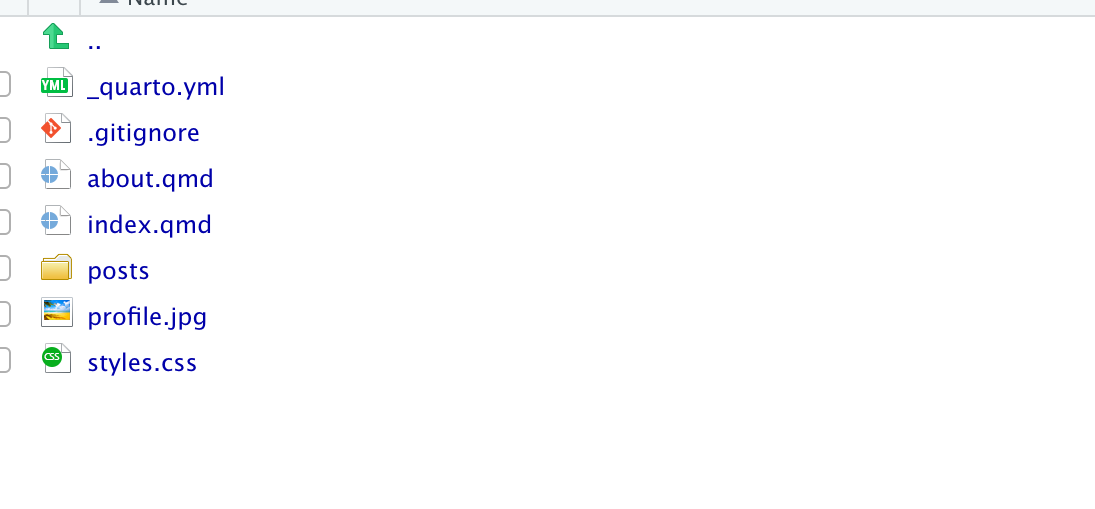
Copy all the documents inside the folder into your project folder, and delete the myblog folder.
Step 4
Rename index.qmd to blog.qmd and rename about.qmd to index.qmd.
Step 5
Include your details to _quarto.yml.
Step 6
Click Render button to preview the blog.
To preview the website in the current directory type the following command in the terminal
quarto preview
Step 7
To publish the blog with Netlify, type the following command.
quarto publish netlify
Other useful links
https://albert-rapp.de/posts/13_quarto_blog_writing_guide/13_quarto_blog_writing_guide.html
https://quarto.org/docs/publishing/netlify.html
https://beamilz.com/posts/2022-06-05-creating-a-blog-with-quarto/en/